⚠️ Warning: this is an old article and may include information that’s out of date. ⚠️
Yesterday John Gruber wrote about Apple’s PastryKit, iPhone’s JavaScript framework that’s been discovered “in the wild” on the iPhone user guide at http://help.apple.com/iphone/3/mobile/. There’s a few ways to access the page:
- with an actual iPhone or iTouch
- by browsing with an iPhone/iTouch user agent. If you’re using Safari, enable the Developer menu in Safari>Preferences>Advanced and switching user agents by clicking on Develope>User Agent
What’s all the big fuss?
John was particularly interested in the responsiveness and native-like interaction of flinging through long lists, the fact the address bar is completely hidden, and the possibility of having a toolbar fixed to the top of the page. PastryKit makes all of these things possible and implements them better than anything else. And the result is nearly indistinguishable from a native app. Here’s a video I made of the iPhone user guide in action, powered by PastryKit. This is running on Safari – it’s not a native app!
PastryKit has been here for a while
As John Gruber points out, the code for PastryKit has been there for quite a while now. Stack Overflow has a question about it that was asked way back in July, and there are several more recent references to it by jQTouch developer David Kaneda on Twitter. Of course, since John’s post there’s been an explosion of interest in the form of even more tweets!
Hopefully with all of this increased attention, we’ll see Apple take notice and address it. Here’s hoping, anyway.
Some interesting features
There’s even more interesting takeaways from the PastryKit code, and I’m sure I’ve just barely scratched the surface:
- implements its own form of Object-Oriented programming (obj.inherits and obj.synthetizes properties). When modules are declared, they’re registered as a PK Class (i.e. PKClass(PKBarButtonItem) registers PKBarButtonItem as a PK Class)
- CSS3 wrapper functions (PKUtils.t() is a wrapper for translate3d, etc.)
- no single library namespace (surprisingly) – which means there are many many global variables. This however is somewhat acceptable, as all variables are prefixed with “PK” and are declared to be constant (const PKStartEvent, const PKEndEvent) and cannot be overwritten.
There’s also some interesting takeaways not from PastryKit itself, but from the way the iPhone user guide is implemented. Most of the data on the page – including each menu icon (base64 encoded) – is located in a single 650kb JSON-encoded file called content.json. This means the initial loading of the page is quite slower than the user would normally expect, but once the initial payload has been delivered, it’s a relatively smooth browsing experience thereafter.
And as John Gruber already pointed out, this data is stored locally with the help of HTML5, allowing the user to continue reading even while offline!
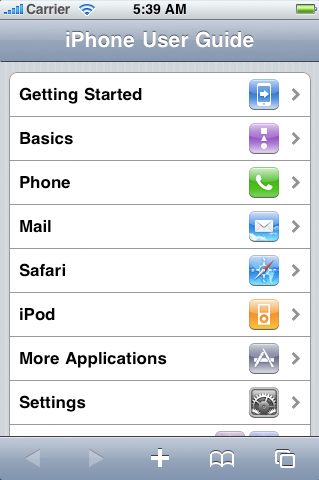
iPhone user guide in Safari
PastryKit unminified and explained (sorta)
What I’m excited to show you now is a result of a bit of effort to make PastryKit more intelligible. Though there’s a minified version of the code on Apple’s website, it’s not obfuscated (and rendered unintelligible), so not all hope is lost! With the help of jsbeautifier.org we can now see the slightly unminified version of the code: PastryKit.js unminified.
The next thing I did was separate each module into its own file. I was able to separate the code into 27 numbered files, with the original ordering preserved (to prevent issues with dependencies). Viewing the code in this way definitely helps make sense of it all. You can download these separate files as part of a little unofficial SDK I made, which also includes a copy of the iPhone user guide with the JS iPhone-only redirect removed: PastryKit unofficial SDK.
PastryKit modules
The following is an explanation of each module I found. The descriptions are definitely incomplete and possibly inaccurate, so any comments or help is appreciated. But this should hopefully shed some light on the matter!
- PKUtils – general helper functions (PKUtils.t() is a wrapper for CSS translate3d, PKUtils.degreesToRadians(), etc, etc.)
- PKEventTriage – general event handler
- PKPropertyTriage – handlePropertyChange() method – ?
- Element – helper functions added to HTML Element prototype
- Node – adds getNearestView() method to HTML Node prototype
- PKClass – custom-rolled class with with “inherits” and “synthetizes” properties
- PKObject – custom-rolled object with observer pattern. Most modules extend from this.
- PKPoint – wrapper for WebKitPoint – used for touch events?
- PKSize – wrapper for width/height properties
- PKImage (inherits PKObject) – helper for creating Image elements and knowing when it’s finished loading (but doesn’t add the image to the DOM)
- PKAnimator – basic animation tweens
- PKTransition – helper for proprietary Webkit CSS transitions
- PKTransaction – interacts with PKTransition – ?
- PKView (extends PKObject) – manages a view, such as handling events that occur within that view – ?
- PKContentView (extends PKView) – ?
- PKRootView (extends PKContentView) – ?
- PKScrollIndicator (extends PKView) – custom scrollbar
- PKScrollView (extends PKView) – handles dynamically positioning the page when it’s scrolled
- PKTableView (extends PKScrollView) – handles more touch/scroll events?
- PKCellPath – ?
- PKTableViewCell (extends PKView) – ?
- PKToolbar (extends PKView) – manages the top toolbar
- PKNavigationView (extends PKView) – manages bottom navigation bar
- PKNavigationItem (extends PKObject) – manages bottom navigation buttons
- PKControl (extends PKView) – manages generic controls
- PKBarButtonItem (extends PKControl) – manages button controls
- PKSearchBar.js (extends PKView) – manages the search bar
Conclusion after a first glance
As far as I can tell, this is no full-fledged JavaScript library. At least not for now.
On first glance PastryKit seems to be at most a nice development framework for making web apps with the same look-and-feel of native iPhone apps. And this framework in many ways does this better than anything out there (at the moment).
I echo the sentiments of Gruber – I do hope we hear more about this from Apple!
Comments